
Hobby & open sourceRuns today
SO-100 / SO-ARM100
TheRobotStudio / LeRobot (Hugging Face)
5 DoF + gripper
Our reference arm. Low-cost, open source, recorded as a leader and follower pair.
Image: TheRobotStudio · Apache-2.0 · edited
The client detects your arm and cameras automatically and guides you through recording, review, and upload - straight into LeRobot format. Custom tasks, camera setups, and arm configurations included. No Python, no terminal, no tinkering weekend.
 camera_25 · wristcamera_17 · front
Most teams with a robot arm lose their first weekend not to the arm, but to the tooling around it.
The LeRobot format is well documented. What eats time is everything before the first Parquet file: finding the serial port, camera indices that change after every reboot, calibrating both arms, keeping the record loop from crashing at episode 14 because one thread fell behind. None of that is research. It is plumbing, redone on every machine and by every newcomer.
The desktop client takes over that plumbing. It scans the serial bus and finds the arm on its port, opens every USB-UVC camera it can see and shows the feeds side by side before you record a single frame. Calibration is a guided pass over all joints, stored on your machine, so leader and follower move together immediately.
From there the client runs the loop every good dataset needs: describe the task, reset the scene, record one episode, review it, keep or discard it, repeat. When you have enough episodes, you upload the dataset to train on a rented GPU or sell it on the marketplace. Until you press upload, every byte stays on your disk.
This is the client's Manual Control view: camera feeds with latency and quality, the joint sliders for shoulder_pan, shoulder_lift, elbow_flex, wrist_flex, wrist_roll and gripper, the leader-follower switch and the record button that writes straight into the active dataset. Try it - the panel is interactive.
Move the leader robot manually and the follower will mirror its movements.
The client guides you through every round - that is how datasets are made that actually move models forward.
Describe the task - it goes into every episode as a language annotation.
Set up the scene, place objects. The client shows you both camera feeds.
Demonstrate with the leader arm. Joint angles and images run in sync.
Watch every episode, sort out weak ones - quality over quantity.
Only when you are ready: upload and train. Until then, everything stays local.
Four typical setups, from a single hobby arm to a pilot project with its own data policy.
Every semester a new group inherits the arms and the half-working record script. With the client the setup is the same on every laptop: install, plug in, calibrate once, record. The task text goes into every episode as a language annotation, so datasets from different students stay comparable and can be merged for a shared ACT or SmolVLA baseline.
The lab keeps raw data on its own machines and uploads only the datasets that are meant for training or publication.
No hidden format. Every episode is a Parquet table plus one MP4 per camera, exactly as lerobot expects it.
When you start an episode, the client reads the follower arm's six joint positions and the leader arm's commands at 30 Hz and writes them as observation.state and action into a Parquet table. Each camera feed is encoded into its own MP4 with matching timestamps. The task text becomes the language annotation SmolVLA, Pi0.5 and GR00T train on.
After each episode the review step plays the recording back with all camera views. You keep it or discard it, and only kept episodes end up in the dataset, so a weak demonstration never reaches training. The folder follows LeRobot v2.1 with meta, data and videos directories and opens in any lerobot script or the Hugging Face viewer without conversion.
Upload is a separate, explicit step. The client archives the dataset and sends it to the platform's S3 bucket under your account, where it shows up in the dashboard with an episode preview. From there you start a training run or list it on the marketplace. The local copy stays where it is.
What the client supports today. More arms are added on request, see the carousel below.
Free client. Install it, plug in your arm, record the first episode tonight.
Record your first datasetBoth produce the same format. The difference is how many evenings it takes to get there.
| Step | lerobot scripts by hand | AY-Robots client |
|---|---|---|
| Setup | Python environment, lerobot checkout, driver packages, robot config file written by hand | One download or one curl line, no Python required |
| Camera setup | Find camera indices, edit them into the config, repeat after every reboot | Cameras are detected and shown side by side, assignment saved per setup |
| Calibration | Command-line pass per arm, results in a JSON you have to keep track of | Guided pass in the app or `ay-robots calibrate`, stored on your machine |
| Recording loop | Fixed episode count and timing per script run, restart on every error | Task, reset, record, review, upload as one loop, keep or discard each episode |
| Review | Open the MP4 files afterwards, delete episodes by hand and fix the index | Playback of all cameras right after the episode, keep or discard with one click |
| Sources of error | Wrong port, swapped cameras, stale calibration, dropped frames noticed at training time | Port and cameras are shown before recording, calibration state is visible in the app |
| Upload and training | Push to a hub by hand, set up a GPU machine, install training stack | Upload from the client, start ACT, SmolVLA, Pi0.5 or GR00T training in the dashboard |
The client writes standard LeRobot v2.1. If you already have lerobot scripts, they keep working on the same folders.
The same SO-100 and control column, in your browser. Get used to leader-follower motion and recording before you touch the real arm.
Hover the scene, then WASD drives base and shoulder, Q/E the elbow, R/F the wrist, T/G rolls it and space closes the gripper. The keys light up as you press them - or hold them here with the mouse.
Every move in the sim can be stored as an episode, exactly like on the real arm.
The CLI installs with one line and also runs as an MCP server - Claude, ChatGPT, and other agents can operate your arm directly.
View the MCP integration$ curl -fsSL ay-robots.com/install.sh | sh
→ Arm detected: SO-100 on /dev/ttyACM0
→ Cameras: 2 found
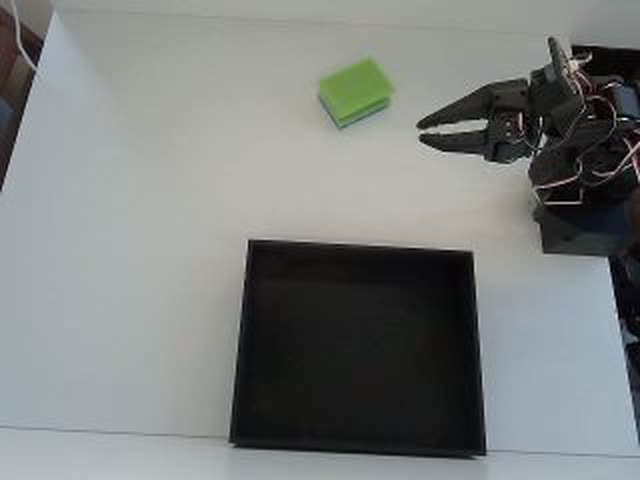
$ ay record --task "Cube into the box"
→ Episode 001 … saved (LeRobot v2.1)
Once installed, the CLI can run as an MCP server. Claude, ChatGPT, Cursor and other agents then see your arm as a set of tools: drive it, start a recording, export a dataset. Every command still goes through the same client on your machine, so the arm never talks to anything you did not install.
A model is only as consistent as its demonstrations. These points decide whether training is worth the GPU minutes.
For a single, well-defined task like a cube into a box, 50 clean episodes are enough for a first ACT policy, and 150 to 300 make it stable. Language-conditioned models like SmolVLA or GR00T benefit from several hundred episodes across a few task variations. A dataset of 80 careful episodes usually beats one of 300 rushed ones.
Variation is where most first datasets fall short. If the cube always sits in the same spot, the model learns that spot, not the task. Move the object between episodes, rotate it, change the box position, vary the lighting. Reset discipline is the other half: start every episode from the same home pose so the first frames are comparable.
A wrist camera makes a difference for grasping because it shows gripper and object at close range. The task text is the language annotation the model trains on: write it like you would ask a person, identical within one task. Use the review step: an episode where the grasp slipped teaches the model exactly that, deleting it costs ten seconds.
Dataset uploaded? Start a training run on a rented GPU, billed by the minute.
See cloud trainingFrom hobby kits to industrial arms. The label on each card shows what runs with AY-Robots today and what we connect on request.
TheRobotStudio / LeRobot (Hugging Face)
Our reference arm. Low-cost, open source, recorded as a leader and follower pair.
Image: TheRobotStudio · Apache-2.0 · edited

Franka Emika
Torque-controlled research arm that appears in many published manipulation datasets.
Image: Ims · CC BY-SA 4.0 · edited

TheRobotStudio / LeRobot (Hugging Face)
Successor to the SO-100 with a revised wrist. Same servos, same workflow.
Image: TheRobotStudio · Apache-2.0

KUKA
Sensitive lightweight robot with seven axes, available with 7 or 14 kg payload.
Image: Xavier Caré / Wikimedia Commons · CC BY-SA 4.0 · edited

LeRobot (Hugging Face)
Open-source arm with Dynamixel servos. Its LeRobot datasets train like SO-100 data.
Image: Jess Moss · Apache-2.0 · edited

Universal Robots
Collaborative robot from the UR e-Series for heavy payloads.
Image: Auledas · CC BY-SA 4.0 · edited

Enactic (Open Source)
Open-source humanoid arm with seven axes, usually built as a two-arm pair.
Image: Enactic · Apache-2.0 · edited

FANUC
Compact six-axis industrial robot for handling small parts.
Image: BorbaZal · CC BY-SA 4.0 · edited

Dobot
Desktop arm for classrooms and maker labs.
Image: Giacomo Alessandroni · CC BY-SA 4.0 · edited

ABB
Dual-arm collaborative robot for small-part assembly.
Image: Stilfehler · CC BY-SA 4.0 · edited

Phenoptix / Mime Industries
Laser-cut acrylic kit with hobby servos, a classic first robot arm.
Image: Phenoptix · CC BY-SA 3.0
No. The desktop client is a standalone application for macOS, Windows and Linux and brings everything it needs. The CLI installs with one curl line. If you already use lerobot, that is fine: the client writes standard LeRobot v2.1 folders your scripts can read directly.
Remote operators drive your arm and record demonstration data around the clock.
Read moreFine-tune GR00T, Pi0.5, SmolVLA or ACT on a rented GPU, billed by the minute.
Read moreServe a checkpoint in the cloud and watch a real arm run it in your browser.
Read moreReal teleop demos become varied simulation episodes, checked automatically and exported in LeRobot format.
Read moreLoad the client, connect your arm, record your first episode - faster than any README.
