
Hobby & open sourceRuns today
SO-100 / SO-ARM100
TheRobotStudio / LeRobot (Hugging Face)
5 DoF + gripper
Our reference arm. Low-cost, open source, recorded as a leader and follower pair.
Image: TheRobotStudio · Apache-2.0 · edited
Global operators drive your robot remotely and record demonstration data for your imitation learning - around the clock, with low latency, under your supervision.
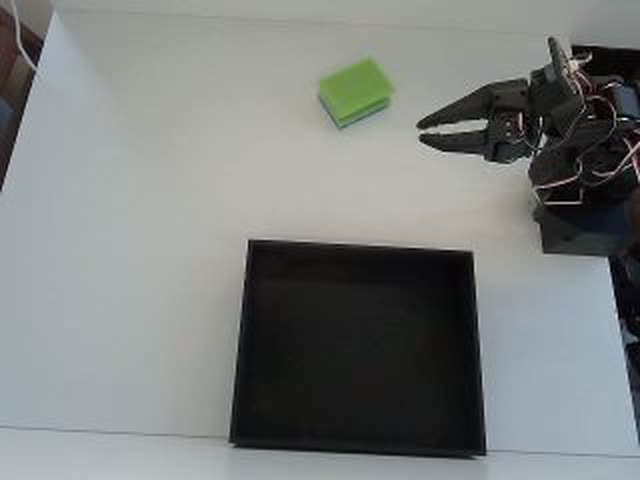 LIVE · camera_1743 ms
Imitation learning needs hundreds of clean demonstrations per task. Most teams have the hardware, but not the hours.
ACT or SmolVLA gets useful after a few hundred episodes of one task; GR00T and Pi0.5 finetunes want more variety on top. Every episode is a person holding a leader arm, doing the task, resetting the scene and starting again. Roughly a minute per episode, so 300 episodes are a full working day of one engineer.
The usual workaround is to record whenever someone has time: a dataset from four afternoons, three people and a camera moved in between. Policies trained on it look fine in the loss curve and fail on the bench, because the demonstrations do not agree. In imitation learning, consistency is the whole signal.
Teleoperation on AY-Robots turns recording into something you book rather than something you do. Your arm stays on your desk with your cameras and objects. Operators connect through the browser, work through the task you describe, and every episode lands in your account as LeRobot v2.1. You set the windows, watch live and take the arm back with one click.
Install the client, connect your arm, release time slots. Your robot appears in the network - you decide when it is available.
Trained operators take over remotely, work through your tasks, and deliver clean demonstration episodes in LeRobot format.
Camera feed, joint angles, and latency live in your browser. You can take over any time - one click and you are in control.
The operator cockpit is the same Manual Control panel as in our desktop client: camera selection, keyboard, mirror or slider mode, record button and live joint readout. You see the same view in your own browser at the same time.
Move the leader robot manually and the follower will mirror its movements.
Interactive mock-up of the real cockpit. In a live session the feed is your WebRTC stream and the joint values come from your arm.
Same mechanism, different goals: a research lab, a startup with a product dataset, a logistics pilot and a seller on the marketplace.
A group compares two policy families on a pick-and-place task and needs the same dataset for both. Instead of splitting recording between two PhD students over three weeks, they release evening slots on their SO-101 for a week. Operators record while the lab is empty; each morning the team reviews the new episodes and rejects those with a knocked-over cup.
Because one task description and one camera setup are used throughout, the two trainings later differ only in the model, not in the data.
No special hardware on your side: the desktop client, your arm, your cameras and a browser tab to watch.
You install the desktop client on the machine with the arm (macOS, Windows, Linux, or curl -fsSL ay-robots.com/install.sh | sh). It finds the arm on its serial port and lists the USB cameras. You pick up to five cameras, typically one on the wrist, calibrate once and describe the task; that description becomes the language annotation of every episode.
Then you release time windows; your arm shows up in the network only inside them. Drive requests go through a FIFO queue: one operator holds control at a time, the next waits, and stale leases expire on their own. Video goes out as WebRTC, commands come back the same way, and the dashboard shows p50 and p99 latency live.
The operator drives with keyboard, sliders or a mirrored leader arm, hits record, performs the task, resets and records again. Each episode is written at 30 fps with all camera streams, the six joint angles and the action sequence. Data stays on your machine until the episode is uploaded to your account as LeRobot v2.1, Parquet plus MP4.
When the window closes, the lease ends and your arm drops out of the network again. What stays is the dataset in your account: you can train on it, keep it private, or list it on the marketplace. Nothing leaves your machine that you did not upload.
The technical facts of a teleoperation session, as they arrive in your account.
Client installed, arm connected, first slot released: that is the whole setup.
Release the first slotThe honest comparison for a team that already owns the arm.
| Criterion | Recording yourself | Operators on AY-Robots |
|---|---|---|
| Time for 100 episodes | Half a day to a full day of one engineer, depending on task | A few session hours, released in the evening and done by morning |
| Personnel cost | Engineer or student hourly rate, plus the work they are not doing | Country hourly rate of the operator, see price preview below |
| Coverage at night and weekends | Only if someone volunteers | Operators across time zones, you release the windows |
| Quality control | Whoever recorded checks their own work, if at all | Review step for every episode, reject before it counts |
| Scaling to several arms | One person per leader arm | Each arm gets its own slots, operators work them in parallel |
| Time to the first dataset | When the calendar allows | First episodes in the first released window |
Billed by the minute, no base fee. The platform keeps 10 %, the operator gets the rest.
Teleoperation only works if the arm feels like it is on your own desk. Our edge network keeps the distance short.
SO-100 and SO-101 with 6 DoF, Koch v1.1, WidowX-250 and Franka FR3. If your arm is missing, request it in the carousel.
From hobby kits to industrial arms. The label on each card shows what runs with AY-Robots today and what we connect on request.
TheRobotStudio / LeRobot (Hugging Face)
Our reference arm. Low-cost, open source, recorded as a leader and follower pair.
Image: TheRobotStudio · Apache-2.0 · edited

Franka Emika
Torque-controlled research arm that appears in many published manipulation datasets.
Image: Ims · CC BY-SA 4.0 · edited

TheRobotStudio / LeRobot (Hugging Face)
Successor to the SO-100 with a revised wrist. Same servos, same workflow.
Image: TheRobotStudio · Apache-2.0

KUKA
Sensitive lightweight robot with seven axes, available with 7 or 14 kg payload.
Image: Xavier Caré / Wikimedia Commons · CC BY-SA 4.0 · edited

LeRobot (Hugging Face)
Open-source arm with Dynamixel servos. Its LeRobot datasets train like SO-100 data.
Image: Jess Moss · Apache-2.0 · edited

Universal Robots
Collaborative robot from the UR e-Series for heavy payloads.
Image: Auledas · CC BY-SA 4.0 · edited

Enactic (Open Source)
Open-source humanoid arm with seven axes, usually built as a two-arm pair.
Image: Enactic · Apache-2.0 · edited

FANUC
Compact six-axis industrial robot for handling small parts.
Image: BorbaZal · CC BY-SA 4.0 · edited

Dobot
Desktop arm for classrooms and maker labs.
Image: Giacomo Alessandroni · CC BY-SA 4.0 · edited

ABB
Dual-arm collaborative robot for small-part assembly.
Image: Stilfehler · CC BY-SA 4.0 · edited

Phenoptix / Mime Industries
Laser-cut acrylic kit with hobby servos, a classic first robot arm.
Image: Phenoptix · CC BY-SA 3.0
You are handing a stranger the controls of your hardware. These are the four things that make that acceptable.
Operators are tiered. Everyone starts as Starter, moves to Skilled after roughly five hours of recorded episodes, and Expert follows with consistently good quality. The country rate on the pricing page is the Expert rate; Starter and Skilled sessions cost less. You see name and tier in the live session, so a delicate task can wait for an Expert window.
Every episode goes through review before it counts. You, or someone on your team, watch it in the dashboard and accept or reject it. Rejected episodes stay in your raw data but are not delivered. Consistent quality moves an operator up a tier, so your review is also the signal that decides who keeps driving.
You are never locked out of your own arm. The takeover button hands you control instantly and pauses the operator until you hand it back. The emergency stop's soft stage lowers the arm and releases the motors, the hard stage cuts torque immediately. If the operator's connection drops, their lease expires and the arm stops receiving commands.
An operator only ever reaches the arm through the platform, and only inside a window you opened. They never touch your machine, your account or the rest of your data, and outside the window the arm is not reachable at all. Close a window and the current lease ends with it.
Want to see what finished datasets look like before you record your own?
Browse the marketplaceOperator rates depend on the operator's country and tier. You pay per session hour, billed by the minute, no base fee and no minimum. Details and the full country table are on the pricing page.
The arm only accepts commands inside the windows you release. You watch every session live, the takeover button gives you control instantly, and the emergency stop has a soft and a hard stage. Joint limits apply to operators exactly as to you.
Record your own datasets with your arm and cameras, straight into LeRobot format.
Read moreFine-tune GR00T, Pi0.5, SmolVLA or ACT on a rented GPU, billed by the minute.
Read moreServe a checkpoint in the cloud and watch a real arm run it in your browser.
Read moreReal teleop demos become varied simulation episodes, checked automatically and exported in LeRobot format.
Read moreCreate an account, connect your arm, release time slots - the first episodes come on their own.
